
the guide · reset day
Two Tuesdays. One line each.
Once a season, take twenty minutes to look at where an ordinary day is heading, and where you’d rather it went. Then make it small enough to start tomorrow.
How it works
- Where you are. Three questions about what you put up with and what you keep complaining about. No fixing yet.
- Two Tuesdays. One five years from now if nothing changes, one three years from now if it goes your way. A good place for a break: take three small questions with you in your calendar, finish tonight.
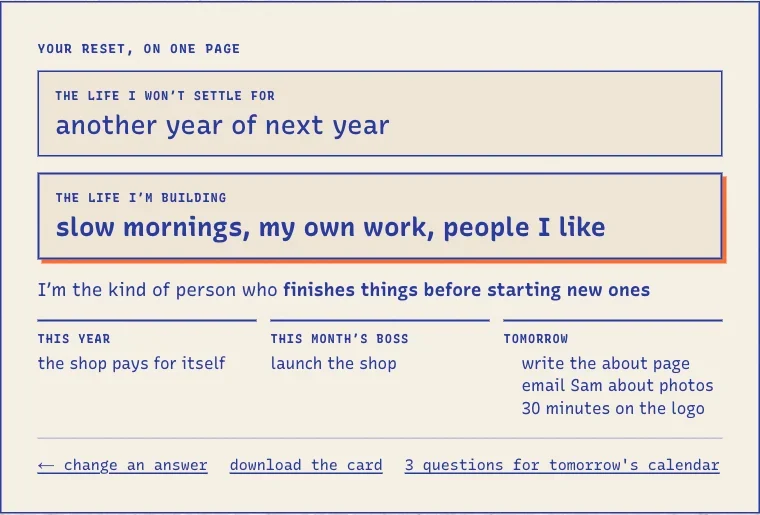
- What’s next. One line for each Tuesday, “I’m the kind of person who…”, one thing for the year, this month’s project and two or three small things for tomorrow.
- Keep what helps. Nuffo keeps the short lines, makes the month’s project one of your projects (or links it to one), and puts tomorrow’s things in later. One tap makes them tomorrow’s three, or pick in the morning.
After the day.
- Say it instead of typing. In the app, “say it instead” under a question turns your voice into words in the box, to read and fix. The audio isn’t kept.
- Save the card. Your two lines as an image, drawn on your device (phones get the share sheet). Nothing is uploaded.
- Your line stays in sight. “The life you’re building” sits quietly at the top of your projects page.
- Once a month, one question. From three weeks after, the Sunday look-back asks: still moving you toward it? Yes puts it away for the month; no is a good moment to shelve something, or to start a new reset.
- Once a season, one offer. In the first week of January, April, July and October, if your last reset is three months old (or you never did one), the Sunday look-back offers one, in a single line. That’s all the reaching out it does.
- Don’t want it? Settings → your day → reset day switches it off everywhere. “Forget my reset lines” deletes what was kept.
Not signed up? The same twelve questions are free at nuffo.app/tools/reset-day, nothing stored. Your answers come along if you sign up in the same browser.
Good to know
- Nuffo asks, you answer. No AI reads, sorts or rewrites your answers. The point is to think it through yourself.
- Your long answers stay on your device. Only the short lines at the end are kept, and only when you tap keep. Then the long answers are wiped.
- Nothing lands on a day by itself. Tomorrow's things go to later. They become tomorrow's three only when you tap it, and never today's.
- New projects still wait a week. This month's project becomes one of your projects straight away only while you're setting up. After that a big new one waits a week; one you already have links at once.
- Three projects, still. Already have three? Link it to one, or shelve one first.
- No scores, no streaks. Nothing counts resets, and nothing is lost if you never do another.
Quick answers
How often should I do it?
Once a season is plenty. The Sunday look-back offers one in the first week of each season; ignore it as long as you like.
Can I compare with last time?
Yes. The start screen shows the line you were building toward last time. Your export includes every kept reset.
Is it on the phone apps?
On the web for now, at nuffo.app/app/reset. Your projects and tomorrow's things show up on the phones as usual.
Is it part of Pro?
No. Reset day is free for everyone: it doesn't use AI. Saying your answers out loud counts as voice, like anywhere in Nuffo.
Can I do it on paper?
Yes. The free reset day worksheet has the same twelve questions with room to write: nuffo.app/printable/reset-day.