
the guide · your calendar
Busy day? Pick light.
Nuffo reads today’s meetings from your calendar, so a day with five of them doesn’t also get three big tasks. It only ever reads.
How it works
- Copy your calendar’s secret link. Google, Apple and Outlook all have one (where to find it is below).
- Paste it in settings. On the web: settings → your day → your calendar (read-only). In the phone apps: settings → your day → your calendar. That’s the whole setup.
- See your day at a glance. Today shows a quiet line like busy 9:00–14:00 · 3 things.
- Packed days go light. Over four hours of meetings and Nuffo says a busy day. pick light., suggesting smaller things.
Where's my link?
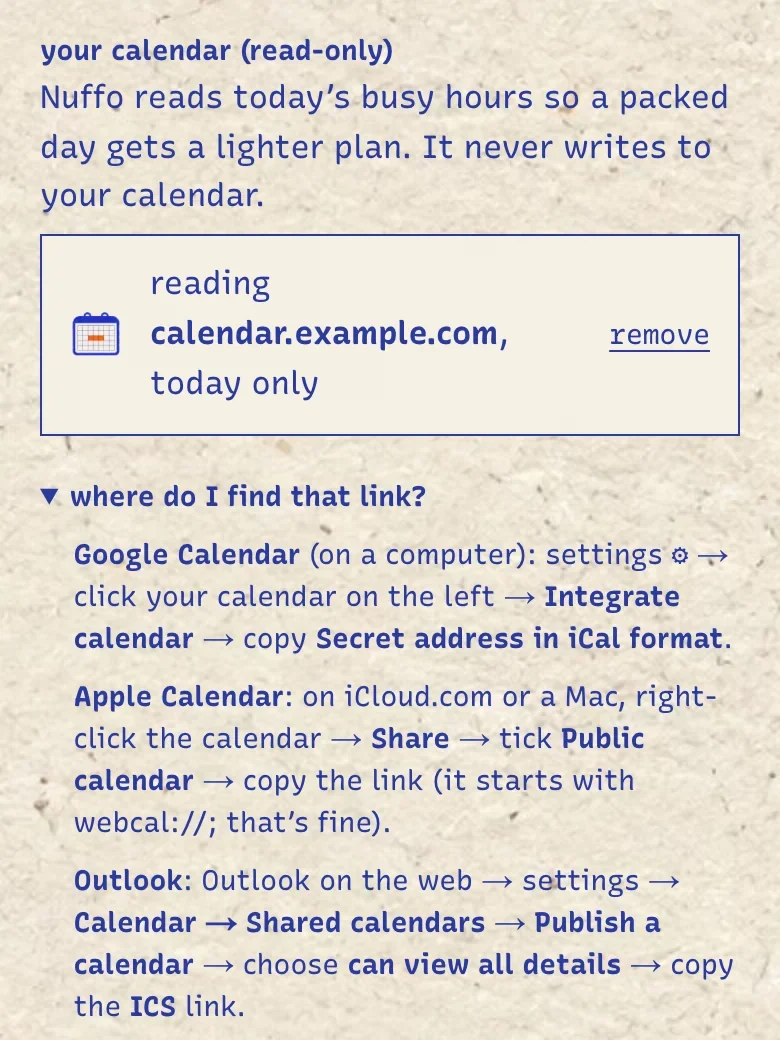
| calendar | where to find the link |
|---|---|
| Google Calendar | On a computer: settings ⚙ → click your calendar on the left → Integrate calendar → copy Secret address in iCal format. |
| Apple Calendar | On iCloud.com or a Mac: right-click the calendar → Share → tick Public calendar → copy the link. It starts with webcal://; that’s fine. |
| Outlook | Outlook on the web: settings → Calendar → Shared calendars → Publish a calendar → can view all details → copy the ICS link. |
What a busy day changes
Nuffo adds up the timed events on today’s calendar, counting overlapping meetings once. More than four hours, and it’s a busy day:
- The plan leans light. Nuffo’s suggested three favour quick things that fit between meetings, at most one heavy one, and each pick says why (a busy day: a light one).
- The morning email says so. If you get the morning plan, it adds one line: busy 9:00–14:00 (3 things). pick light.
- You still choose. It’s a suggestion. Pick the big thing anyway if today is the day; Nuffo won’t argue.
Nuffo picks what, not when. It doesn’t timebox your three into gaps or move anything around. Your calendar keeps the hours; Nuffo keeps the list short.
What Nuffo reads, and what it leaves alone
| reads | leaves alone |
|---|---|
| Today's events: start, end and title | Anything before or after today |
| Repeating events (daily, weekly, monthly, yearly) | Descriptions, places and guest lists |
| Time zones, Outlook's included | Events marked cancelled, or shown as free |
| All-day events, as a count | Writing anything back, ever |
Real days
- A nurse on a long shift. An eight-hour shift is one event and more than four busy hours, so the plan goes light: the quick things, the ones that fit a break. On days off, the full three.
- A parent with a meeting-heavy job. Outlook’s published link shows busy 9:00–16:30 · 6 things. Nuffo leans to “send the school form” over “rewrite the proposal”, and says why.
- A student with lectures. A Google calendar of lectures and lab slots. Light days get the essay; packed days get “email the tutor”.
- Birthdays and holidays. All-day events show as a quiet count (2 all-day things on the calendar) and never make a day look full.
Privacy, plainly
- Your link works like a password to your calendar. Nuffo keeps it on its server and never shows it again, not even to you; it’s never sent to your browser or phone. Settings only says which calendar service it reads.
- Nuffo keeps a short copy of today’s events (times and titles, cut to 120 characters) for up to 30 minutes. Nothing else.
- Nothing from your calendar lands in your list or on today. Events stay events.
- Tap remove in settings and the link and that copy are deleted straight away. The full detail is in the privacy notes.
If something’s off
- “That doesn't look like a calendar address.” Nuffo needs the secret iCal address, starting with https:// or webcal://, not the page you see in your browser. Use the table above to find it.
- Connected, but Today shows nothing. Nuffo only shows today. If today is empty in your calendar, there’s nothing to say. If not, check the link opens without signing in (Apple: Public calendar ticked; Outlook: can view all details).
- I added a meeting and it isn’t there yet. Nuffo keeps today’s events for up to 30 minutes before it looks again, so the app stays fast. Give it a little while.
- One repeating meeting is missing. Simple rhythms are read (every day, every week on certain days, monthly on a date, yearly). Fancier ones, like “the second Tuesday of the month”, are left out rather than guessed at.
- A huge calendar stopped showing. Nuffo reads calendar files up to 1 MB and 5,000 events, and waits a few seconds at most. Years of history usually fit; if yours doesn’t, link a smaller calendar. After three failed reads in a row, Nuffo rests the link for a few hours before trying again.
Busy days are when the list in your head gets loudest. Empty it into the free brain dump, or put today’s three on your lock screen with the wallpaper maker.
Good to know
- Read-only, always. Nuffo never adds, moves or changes an event. It reads today's busy hours, that's all.
- Your link stays secret. It's kept on our server and never sent back to your browser or phone. Remove it anytime in settings.
- Today only. Nuffo keeps just today's events, for a little while, to shape today's plan. Remove the link and they're gone too.
- Never slows you down. A slow calendar never holds up the app: Nuffo shows what it has and catches up in the background.
- One calendar. One link at a time. Pick the one that fills your days.
- Free. The calendar overlay is part of Free, on the web, iPhone and Android.
Quick answers
Does Nuffo put my tasks in my calendar?
No. Nuffo never writes to your calendar. Your three stay in Nuffo, and your calendar stays as it is.
Which calendars work?
Any calendar with an iCal (ICS) link: Google Calendar, Apple iCloud Calendar, Outlook and most others.
Is the secret link safe to paste?
Anyone with it can see your calendar, so keep it private. Nuffo keeps it on the server, never shows it again, and only reads it.
What counts as a busy day?
More than four hours of timed events today, with overlaps counted once. All-day events don't count, so a birthday doesn't make your day look full.
How quickly do changes show up?
Within about 30 minutes. Nuffo keeps today's events that long before it looks again.
Does Nuffo see my meeting notes or who's invited?
No. It reads each of today's events' start, end and title. Descriptions, places and guests are skipped.
Can I connect more than one calendar?
One link for now. If you keep work and life separate, use the one that fills your days.