
the guide · repeating tasks
Say it once.
Bins, plants, rent, the smoke alarm. Tell Nuffo how often and it comes back by itself, into later when it’s due. Today stays yours to fill.
How it works
- Dump it with a rhythm. “water the plants every sunday” is enough: Nuffo takes the “every sunday” off the words and sets the repeat. Typed, spoken, or sent from your AI or the capture link, it works the same.
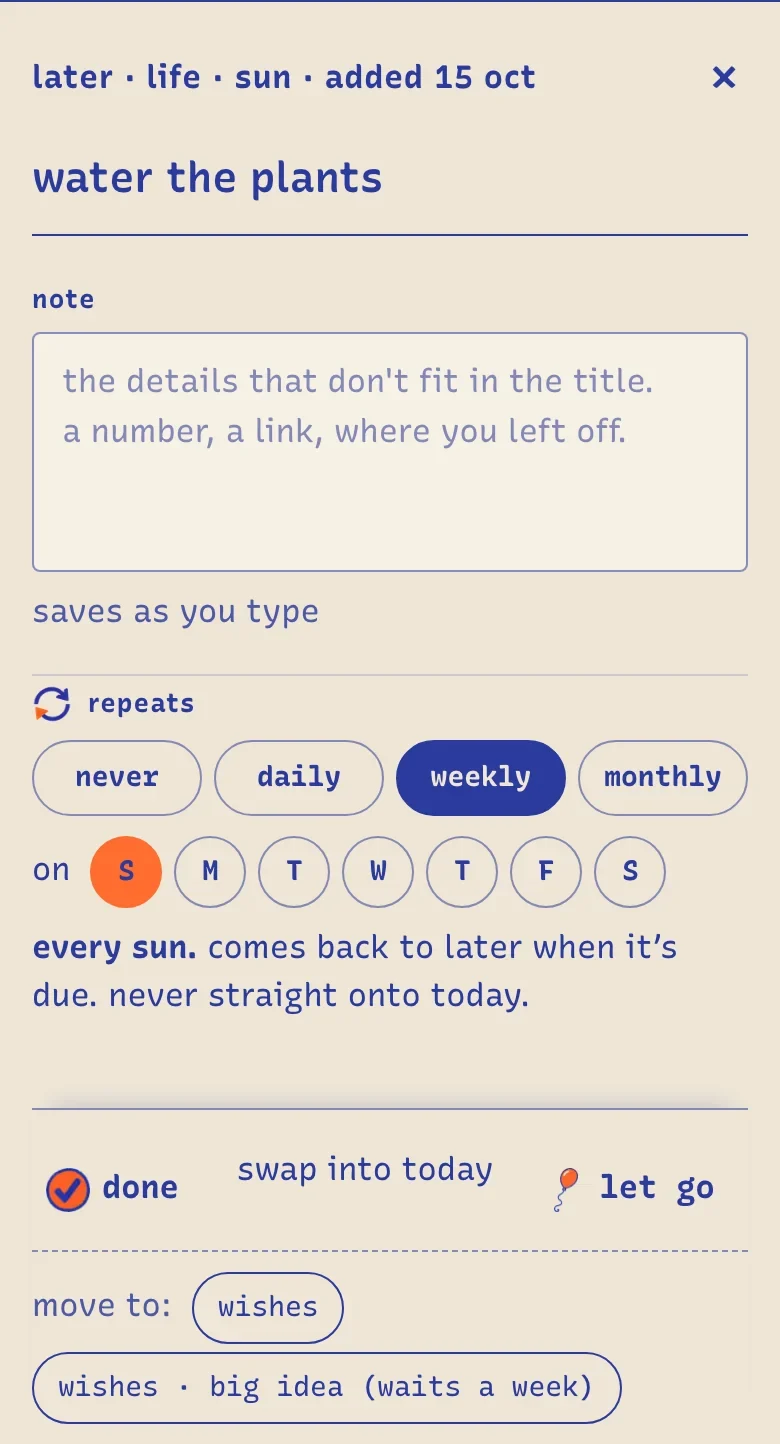
- Or set it by hand. Tap the task’s words, then repeats: daily, weekly on the days you tick, or monthly on a date. On the web, iPhone and Android alike.
- Tick it off. The next one appears in later under coming up, dated for its next day, with its rhythm beside it.
- Pick it when it matters. Nuffo may suggest it for today’s three when it’s due. You still say yes.
Say it in a dump
Type or say these as part of any dump. Nuffo understands them in a ramble too.
| you say | it repeats |
|---|---|
water the plants every sunday | every Sunday |
stretch every weekday | Monday to Friday |
gym every monday and thursday | Mondays and Thursdays |
call grandma every other friday | every other Friday |
book a haircut every 6 weeks | every 6 weeks |
pay rent on the 1st of every month | monthly, on the 1st |
check the smoke alarm every 3 months | every 3 months |
take vitamins daily | every day |
Also understood: every day, every week, every month, weekly, monthly, on weekdays, every tue, thu, every month on the 15th and monthly on the 3rd. The details panel sets daily, weekly or monthly; for “every other” or “every 6 weeks”, say it in a dump and the panel keeps that rhythm.
What happens when you tick one off
- One new copy, in later. Same words, same note, same project. It’s due on the rhythm’s next date after today, counted from the one you just finished, so “every 2 weeks” keeps its weeks even when you’re late.
- Its checklist, minus what you got. A repeating thing with a checklist comes back with the lines you didn’t tick (the weekly shop).
- Never onto today. The new one waits in later. Your three are picked by you, every day (that’s the whole point of Nuffo).
- Undo is clean. The receipt says when the next one is due. Undo the tick and the new copy goes again, as long as you haven’t touched it.
- Letting go stops it. Let a repeating task go and no new one is made. Changed your mind? Undo brings it back.
Real life, on repeat
- Bin day. Dump “bins out every tuesday”. If you share a list with your home, tap share with home in the add box first: then whoever takes them out ticks it off, and next Tuesday’s comes back to everyone’s later. See a shared list.
- Rent, and the other monthly money things. “pay rent on the 1st of every month”. Put the account details in the task’s note once; the note comes along with every new one.
- The haircut you always forget. “book a haircut every 6 weeks”. If you tick it off a week late, the next one is still counted from the old date, so the rhythm holds.
- Calling grandma. “call grandma every other friday”. On a Friday when she’s due, pick it as one of your three. On a full Friday, leave it in later and do it Saturday. Nothing piles up.
Reminders: for today only
A repeat brings a task back to later; a reminder pings you at a time. Once a repeating task is one of today’s three, tap its words and use remind me at. Reminders are only for today’s three (pick a time later today), because a ping for something you haven’t chosen is just noise. Try it on anything else and Nuffo says “Reminders are for today’s three.”
Phones ping you with a notification of their own. The web pings while a Nuffo tab is open: a browser notification if you allowed them, otherwise a quiet note on the page. On a shared thing, everyone sets their own time.
If something’s off
- I said “every 14 days” and nothing repeats. Repeats go up to every 12 days, weeks or months. Past that, Nuffo keeps your words as they are rather than guess. Try “every 2 weeks”.
- “Only tasks repeat. Plan it first.” Wishes and big ideas don’t repeat. Move it to later as a task first, then set it to repeat.
- I ticked it off and can’t find the next one. It’s in later under coming up, with its date. If an older copy of the same task is still open, Nuffo waits for that one instead of making a second.
- Will “weekly review” turn into a repeat? It shouldn’t: “weekly review”, “daily standup” and the like are names, not rhythms, so the words stay. Want it to repeat anyway? Tap its words and set repeats by hand.
- My repeats from Todoist didn’t come along. An import brings repeating tasks in once, without a date. Tap each one and set repeats. More in bring your list.
Still a lot in your head? Empty it into the free brain dump first, then bring the repeating bits over. And if you like today’s three where you can see them, the wallpaper maker puts them on your lock screen.
Good to know
- Never straight onto today. A repeat comes back to later. Only your tap puts something on today.
- Up to every 12. Every 1 to 12 days, weeks or months. Short months use their last day for the 29th to 31st.
- One at a time. The next one appears when you tick this one off, so a missed week never piles up five copies.
- Your own dates. Due dates follow your time zone, so a Sunday repeat lands on your Sunday.
- Shared ones stay shared. A repeating thing on a household list comes back on that list, for everyone in it.
- Free. Repeating tasks are part of Free, on the web, iPhone and Android.
Quick answers
Will a repeating task fill my day?
No. It comes back to later when it's due. Nuffo may suggest it for today's three, but nothing lands on today unless you pick it.
What if I skip one?
Nothing piles up. It stays in later until you tick it off or let it go, and the next one only appears after that.
How do I stop a task repeating?
Tap its words and set repeats to never. Letting it go stops it too.
Can I repeat something on several weekdays?
Yes. Tick the days in the task's details, or dump it: "gym every monday and thursday".
Can I repeat every other week or every 3 months?
Yes, up to every 12 days, weeks or months. Say it in a dump ("every other friday", "every 3 months") and the task keeps that rhythm.
What happens on the 31st in a short month?
Short months use their last day, so "every month on the 31st" lands on 30 April and 28 or 29 February.
Do repeats work with reminders?
A reminder is for one of today's three. Once a repeating task is on today, you can set a time for it like any other.